

Введение
Garmin Forerunner 945 считается одним из самых продаваемых часов Garmin для бега и триатлона. Тем не менее, после нескольких лет использования устройства могут возникнуть такие проблемы, как треснувший дисплей, неисправность сенсорного экрана, сломанный корпус или ухудшение состояния батареи. К счастью, во многих случаях эти проблемы можно решить дома.
В этой статье представлено подробное руководство по правильной разборке и ремонту экрана Garmin Forerunner 945.
Инструменты и запчасти для Garmin Forerunner 945
Прежде чем приступить к работе, подготовьте следующие инструменты и запасные части для ремонта Garmin Forerunner 945:
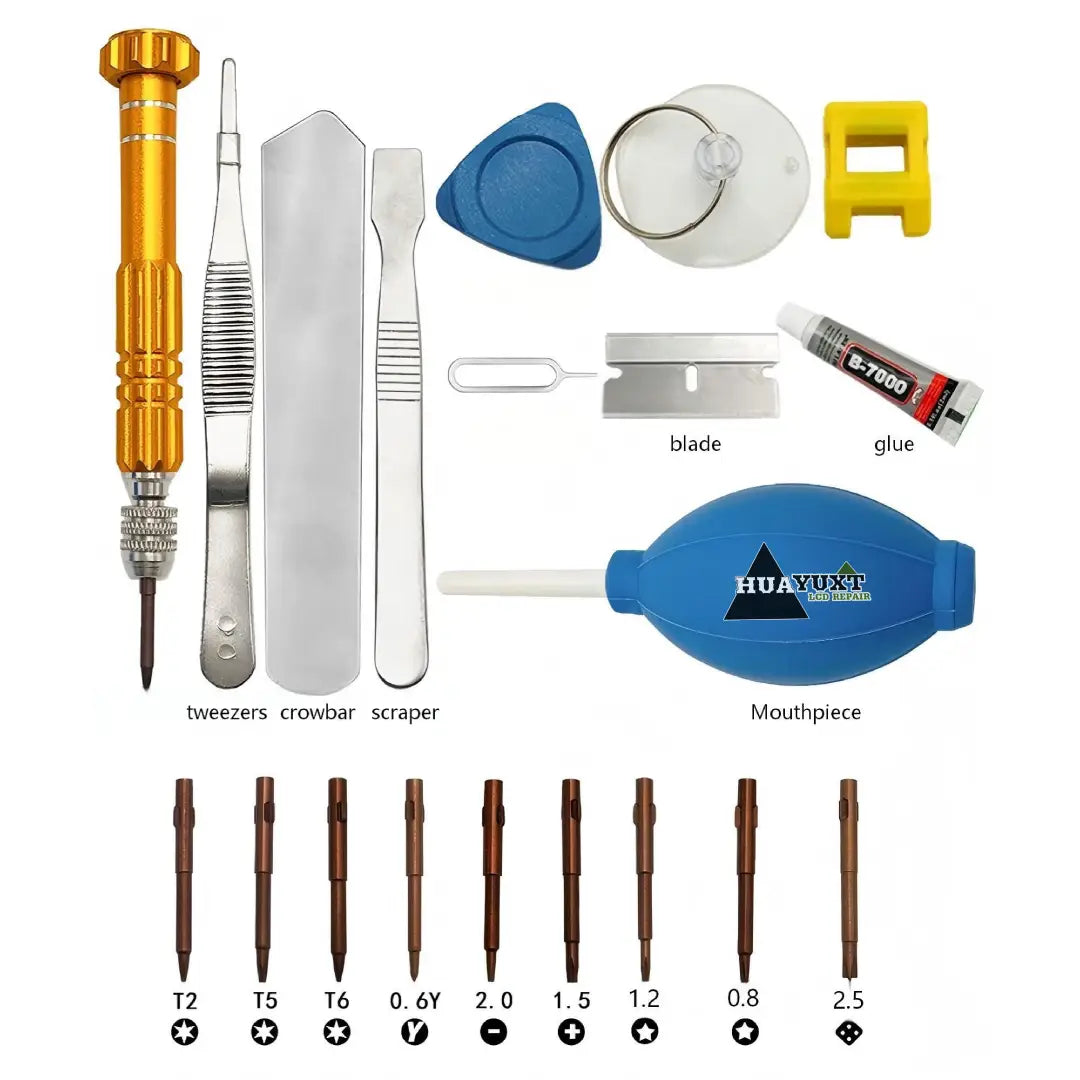
Рекомендуемые инструменты
- Фен или термопистолет
- Бритвенное лезвие или тонкий инструмент для поддевания
- Пластиковый инструмент для вскрытия
- Пинцет
- Спиртовые салфетки
- Перчатки
- Клей-герметик
Распространенные запчасти для ремонта Garmin Forerunner 945
- Замена экрана Garmin Forerunner 945
- Корпус Garmin Forerunner 945
- Задняя крышка корпуса Garmin Forerunner 945
- Замена батареи
- Разъем для зарядки
- Антенна NFC
- Водонепроницаемый клеевой уплотнитель
Использование качественных запасных частей для ремонта Garmin Forerunner 945 поможет сохранить долговечность и производительность дисплея.
Шаг 1 — Определение необходимости замены экрана Garmin Forerunner 945

Если циферблат ваших часов поврежден, не реагирует на прикосновения, мерцает или почернел, вам может понадобиться новый экран Garmin Forerunner 945.
Эти сменные экраны доступны на различных веб-сайтах, включая eBay и Amazon, а также на Huayuxt.com. Большинство людей выбирают самостоятельный ремонт из-за высоких затрат, возникающих при обращении за официальной заменой.
Важно отметить, что экран должен быть совместим с часами Garmin Forerunner 945.
Шаг 2 — Нагрейте, чтобы размягчить клей

Экран обычно крепится прочным клеем. Пожалуйста, установите фен и осторожно нагревайте края дисплея в течение примерно двух минут.
Избегайте прямого нагрева ремешка часов, чтобы не повредить его резиновый материал; вы можете снять ремешок перед началом процесса нагрева.
Этот шаг имеет решающее значение, так как он помогает предотвратить растрескивание других компонентов при разборке безеля и сборки дисплея Garmin Forerunner 945.
Шаг 3 — Снимите старый экран Garmin Forerunner 945

Осторожно вставьте бритвенное лезвие или тонкий инструмент для поддевания под край дисплея.
Медленно продвигайтесь по краю:
- Аккуратно покачивайте лезвие вперед-назад;
- Постепенно поддевайте вверх;
- Если клей снова затвердеет, продолжайте нагревать.
На этом этапе терпение имеет решающее значение, чтобы избежать повреждения внутренних разъемов или корпуса Garmin Forerunner 945.
Шаг 4 — Отсоедините шлейфы

Внутри часов вы найдете два шлейфа, прикрепленных к материнской плате.
Осторожно отсоедините их с помощью пинцета:
- Избегайте касания близлежащих компонентов
- Не применяйте силу к разъемам
- Работайте при ярком освещении
Эти хрупкие разъемы — одна из самых легко повреждаемых частей во время ремонта.
Шаг 5 — Удалите остатки клея

После снятия экрана остатки клея останутся вокруг внутреннего безеля.
Используйте пинцет, чтобы медленно отклеить старый клей. Если клей слишком твердый, осторожно нагрейте его.
Тщательная очистка поверхности помогает гарантировать, что новый экран Garmin Forerunner 945 будет плотно прилегать, и повышает эффективность водонепроницаемого уплотнения.
Шаг 6 — Перенесите антенну NFC (необязательно)


Некоторые сменные дисплеи не поставляются с оригинальной антенной NFC.
При необходимости:
- Аккуратно отклейте черный компонент NFC от старого экрана;
- Перенесите его на новый дисплей;
- Убедитесь, что он правильно выровнен и приклеен обратно в исходное положение.
Неправильное размещение может привести к неправильной установке разъема шлейфа.
Шаг 7 — Подключите новый экран Garmin Forerunner 945

Подключение нового шлейфа дисплея часто является самой сложной частью всего процесса ремонта.
Для подключения этого крошечного черного разъема NFC требуется:
- Достаточное освещение
- Достаточное терпение
- Точное выравнивание
Многие ремонтники рекомендуют подключать шлейф *до* нанесения клея. Преимущество такого подхода заключается в том, что если потребуется тонкая настройка позже, процесс останется гораздо более гибким и управляемым.
Шаг 8 — Нанесите клей на корпус Garmin Forerunner 945

После подключения кабелей:
- Осторожно удерживайте экран
- Нанесите клей вокруг внутреннего безеля
- Плотно прижмите экран на место
Надевайте перчатки, чтобы избежать попадания клея на руки. Удалите излишки клея спиртовыми салфетками до его высыхания.
Правильная герметизация вокруг корпуса Garmin Forerunner 945 помогает восстановить водонепроницаемость.
Шаг 9 — Дайте экрану застыть
Положите на часы предмет значительного веса, чтобы обеспечить равномерное давление на экран.
Дайте клею застыть не менее двух часов, прежде чем включать часы.
Многие часовщики рекомендуют держать часы сухими не менее 24 часов после склейки.
Распространенные запчасти для ремонта Garmin Forerunner 945, которые могут вам понадобиться
Экран Garmin Forerunner 945
Дисплей является наиболее часто заменяемым компонентом из-за трещин и проблем с сенсорным экраном.
Корпус Garmin Forerunner 945
Корпус или безель могут поцарапаться, погнуться или повредиться после падений.
Запчасти для замены батареи
Старые часы могут страдать от сокращения срока службы батареи или проблем с зарядкой.
Компоненты зарядного порта
Коррозия и повреждение влагой могут со временем повлиять на надежность зарядки.
Использование высококачественных запчастей для ремонта Garmin Forerunner 945 повышает успешность ремонта и продлевает срок службы часов.
Аксессуары для ремонта Garmin Forerunner 945 повышают шансы на ремонт и долговечность.
Набор инструментов для ремонта Garmin премиум-класса
Заключительные мысли
Ремонт Garmin Forerunner 945 дома может значительно сэкономить деньги по сравнению с официальными программами замены. С терпением, правильными инструментами и надежными запасными частями для Garmin Forerunner 945 даже поврежденный экран часов часто можно успешно восстановить.
Если вы будете осторожны во время разборки и нанесения клея, ваш отремонтированный экран Garmin Forerunner 945 снова будет выглядеть и функционировать почти как новый.


